Roll your own analytics with SvelteKit and PayloadCMS
Inspired years ago by PC Maffey’s ‘Roll Your Own Analytics’ when it hit the front page of Hacker News, I got the itch to do my own noninvasive analytics, but with SvelteKit and Payload.
My opening goals were to:
- build a (humane) Svelte tracker
- create a simple Payload content type to persist the data (including a
beforeOperationHookfor additional processing) - build a React route/view with some basic dataviz to show data within the dashboard.
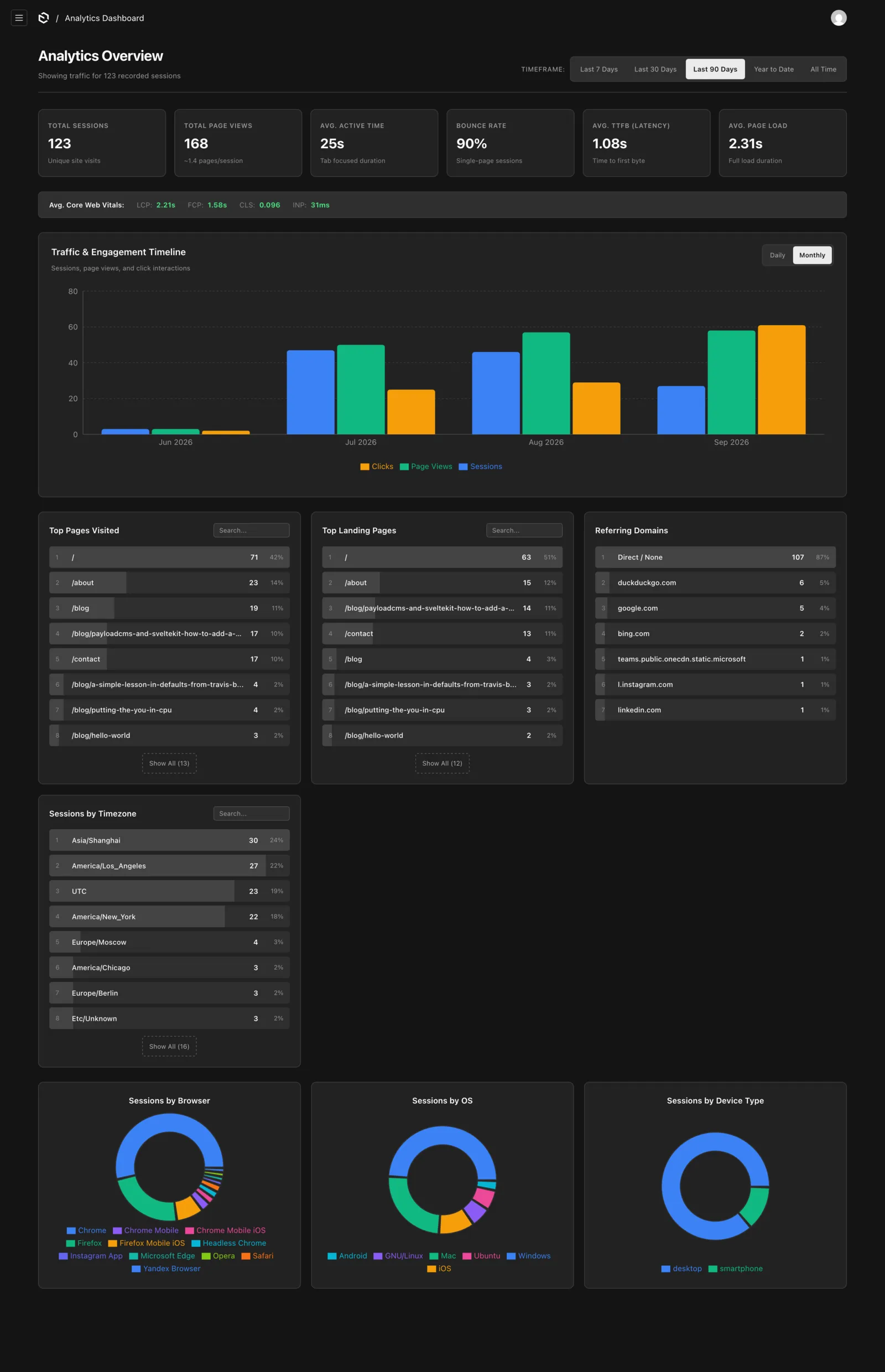
It’s been through a few iterations over the years as I’ve improved upon it in chunks. Here’s what it looks like today:
The why
Some of y’all have never seen a business built around a content management system, and it shows.
By the time I went about this I’d already worked with a company that was effectively built around a heavily customized Drupal 6 install. The CMS was the main source of truth, and it synced with everything.
In the early/mid 2010s I’d already worked on some big websites, but this was different. I was accustomed to brochureware, or a handful of rigid/canned content types being themed or mushed into page designs — this was flowing business data. If it was a lead or opportunity going into Salesforce, it likely came from the CMS, and started as a form someone filled out. Customer accounts, communications and other data were all CMS-first. Product transactions. Reports. Paid content. Newsletters. Central to it all was this monolithic CMS implementation, heavily leveraging its data abstraction layer, along with some direct database querying. The experienced Drupal buff will have an idea of how brutal this would’ve all been on D6, especially relative to modern, Symfony-based Drupal.
Considering how small this company was, it was at least a little bit ahead of its time. Complex data pipelines are pretty typical now, as data will often be set up to persist from one main database to ETL pipelines and analytical databases, but at the time the data science scene we know today was still pretty young.
That is all to say I was going into this quite comfortable with the idea of pushing a CMS, using it more as an app framework, and persisting arbitrary data shapes. After all, any worthwhile CMS is, at a minimum, a reasonably thin data abstraction layer on top of a database + an admin/user dashboard to log into.
AI Disclosure
I started and launched the first iteration of this well before you could outright ask an LLM to one-shot an analytics tracker/backend of your own and get a reasonably useable result to build upon. But I think it’s still worth writing about, even if only because it was a pet project I’d put a lot of human effort into.
Before writing this post, I gave a few different models a crack at improving upon my existing work, and cleaning up some eyesores I’d left behind for my future self. I’ll cover that more as I get there.
I have a complicated relationship with the advent of LLMs (probably a topic for a later post). I’m happy to use AI and its relevant tools for applications/work where they excel, and the application is humane. But I have deep qualms about the act of asking a computer to generate content intended for direct human consumption and presenting it to other humans as though it came from an equal-ish human effort. I wouldn’t do that to you. The writing here will always be my own human output, warts, em dashes and all.
The tracker
My goals being similar to PC’s (particularly the emphasis on privacy), I initially set out to make a 1:1 port of PC’s tracker to Svelte (it would’ve been the v3/v4 syntax at the time). Along the way I attempted to modernize it a bit to use the browser-native Performance interface, and recently returned to improve it a bit with a variety of LLMs.
Today, it looks something like this:
<script lang="ts">
  import { onMount } from 'svelte'
  // these ‘$app’ imports are SvelteKit-specific
  import { onNavigate } from '$app/navigation'
  import { page } from '$app/state'
  import { browser } from '$app/environment'

  interface EventLog {
    event: string
    createdAt: number
    label?: string
    timestamp?: number
    x?: number
    y?: number
    target?: string
    type?: string
  }

  let activeTime: number = $state(0)
  let events: EventLog[] = $state([])
  let lang: string | undefined = $state(undefined)
  let latency: number | undefined = $state(undefined)
  let pageLoad: number | undefined = $state(undefined)
  let ref: string | undefined = $state(undefined)
  let sessionId: string | undefined = $state(undefined)
  let sessionStart: number | undefined = $state(undefined)
  let tz: string | undefined = $state(undefined)
  let ua: string | undefined = $state(undefined)
  let utmCampaign: string | null = $state(null)
  let utmMedium: string | null = $state(null)
  let utmSource: string | null = $state(null)
  let viewport: string | undefined = $state(undefined)

  // Core Web Vitals
  let lcp: number = $state(0)
  let cls: number = $state(0)
  let fcp: number = $state(0)
  let inp: number = $state(0)

  let payload = $derived({
    sessionStart,
    latency,
    sessionId,
    ref,
    ua,
    lang,
    tz,
    viewport,
    utmSource,
    utmMedium,
    utmCampaign,
    activeTime: Math.round(activeTime),
    performanceEntries: { lcp, cls, fcp, inp },
    events,
    pageLoad,
  })

  let sent = false
  let visibilityVisibleTime = Date.now()

  const handleVisibilityChange = () => {
    if (window.document.hidden) {
      activeTime += (Date.now() - visibilityVisibleTime) / 1000
    } else {
      visibilityVisibleTime = Date.now()
    }
  }

  let scrollMarks = new Set<number>()
  let scrollTimeout: ReturnType<typeof setTimeout> | null = null

  const handleScroll = () => {
    const h = window.document.documentElement
    const b = window.document.body
    const scrollTop = h.scrollTop || b.scrollTop
    const scrollHeight = h.scrollHeight || b.scrollHeight
    const percent = Math.floor(scrollTop / (scrollHeight - h.clientHeight) * 100)

    for (const mark of [25, 50, 75, 100]) {
      if (percent >= mark && !scrollMarks.has(mark)) {
        scrollMarks.add(mark)
        logEvent('SCROLL_DEPTH', { label: `${mark}%` })
      }
    }
  }

  const throttledScroll = () => {
    if (!scrollTimeout) {
      scrollTimeout = setTimeout(() => {
        handleScroll()
        scrollTimeout = null
      }, 500)
    }
  }

  const randomString = (length: number = 4) => Math.random().toString(20).substring(2, length)

  const startSession = () => {
    const firstPagePath = page.url.pathname
    logEvent(firstPagePath, { label: 'PAGE' })

    sessionStart = Date.now()
    sessionId = sessionStart + randomString()
    ref = window.document.referrer
    ua = navigator.userAgent
    lang = navigator.language
    tz = Intl.DateTimeFormat().resolvedOptions().timeZone

    window.addEventListener('pagehide', fin)
    window.addEventListener('visibilitychange', handleVisibilityChange)
  }

  const fin = () => {
    if (sent) return
    sent = true

    if (!window.document.hidden) {
      activeTime += (Date.now() - visibilityVisibleTime) / 1000
    }

    logEvent(window.document.location.pathname, { label: 'EXIT' })

    // this is a SvelteKit route that proxies to Payload
    fetch('/api/analytics', {
      method: 'POST',
      headers: { 'Content-Type': 'application/json' },
      body: JSON.stringify(payload),
      keepalive: true,
    }).catch(() => {
      navigator.sendBeacon?.('/api/analytics', JSON.stringify(payload))
    })
  }

  const logEvent = (name: string, properties: Partial<EventLog> = {}) => {
    const now = Date.now()
    const objEvent: EventLog = {
      event: name && name.length > 50 ? name.substring(0, 47) + '...' : name,
      createdAt: now,
      ...properties,
    }
    events = [...events, objEvent]
    return objEvent
  }

  const logClick = (e: MouseEvent) => {
    const target = e.target as HTMLElement | null
    if (!target) return

    const interactive = target.closest('a, button, input, select, textarea, [role="button"]') as HTMLElement | null
    if (!interactive) return

    let targetIdentifier = interactive.tagName.toLowerCase()
    if (interactive.id) {
      targetIdentifier += `#${interactive.id}`
    } else if (interactive.className && typeof interactive.className === 'string') {
      const classStr = interactive.className.trim()
      if (classStr) {
        const classes = classStr.split(/s+/).filter(c => c.length <= 10)
        if (classes.length > 0) targetIdentifier += `.${classes.join('.')}`
      }
    }

    const rawText =
      ('outerText' in interactive ? (interactive as HTMLElement & { outerText: string }).outerText : interactive.innerText)
      ?? interactive.getAttribute('aria-label')
      ?? interactive.getAttribute('title')
      ?? 'Click'
    const text = rawText.replace(/s+/g, ' ').trim().substring(0, 100)

    let label = 'CLICK'
    const anchor = interactive.closest('a')
    if (anchor?.hostname && anchor.hostname !== window.location.hostname) {
      label = 'OUTBOUND_LINK'
    }

    logEvent(text, {
      label,
      timestamp: e.timeStamp,
      x: e.clientX,
      y: e.clientY,
      target: targetIdentifier,
      type: e.type,
    })
  }

  const perfObserver = (list: PerformanceObserverEntryList) => {
    list.getEntries().forEach((entry) => {
      if (entry.entryType === 'largest-contentful-paint') {
        lcp = Math.round(entry.startTime)
      } else if (entry.entryType === 'layout-shift') {
        if (!(entry as PerformanceEntry & { hadRecentInput: boolean }).hadRecentInput) {
          cls += (entry as PerformanceEntry & { value: number }).value
        }
      } else if (entry.entryType === 'paint' && entry.name === 'first-contentful-paint') {
        fcp = Math.round(entry.startTime)
      } else if (entry.entryType === 'event') {
        const duration = (entry as PerformanceEventTiming).duration ?? 0
        if (duration > inp) inp = Math.round(duration)
      }
    })
  }

  const observer =
    browser && typeof PerformanceObserver !== 'undefined'
      ? new PerformanceObserver(perfObserver)
      : undefined

  if (observer) {
    try {
      observer.observe({ type: 'largest-contentful-paint', buffered: true })
      observer.observe({ type: 'layout-shift', buffered: true })
      observer.observe({ type: 'paint', buffered: true })
      observer.observe({ type: 'event', buffered: true, durationThreshold: 16 } as PerformanceObserverInit)
    } catch {
      observer.observe({ entryTypes: ['paint'] })
    }
  }

  onNavigate((navigation) => {
    if (navigation.from && navigation.to) {
      if (navigation.from.url.pathname !== navigation.to.url.pathname) {
        scrollMarks = new Set()
        logEvent(navigation.to.url.pathname, { label: 'PAGE' })
      }
    }
  })

  onMount(() => {
    if (!browser) return

    viewport = `${window.innerWidth}x${window.innerHeight}`

    const searchParams = page.url.searchParams
    utmSource = searchParams.get('utm_source')
    utmMedium = searchParams.get('utm_medium')
    utmCampaign = searchParams.get('utm_campaign')

    visibilityVisibleTime = Date.now()
    window.document.addEventListener('scroll', throttledScroll, { passive: true })

    startSession()

    const captureMetrics = () => {
      const navEntry = window.performance.getEntriesByType('navigation')[0] as PerformanceNavigationTiming
      if (navEntry) {
        latency = Math.round(navEntry.responseStart)
        if (navEntry.loadEventEnd > 0) {
          pageLoad = Math.round(navEntry.loadEventEnd)
        }
      }
    }

    if (window.document.readyState === 'complete') {
      captureMetrics()
    } else {
      window.addEventListener('load', captureMetrics)
    }
  })
</script>

<svelte:document onclick={logClick} />
<div class="dot sr-only"></div>
Data view
I’d initially toyed with massaging the data using Arquero, but ultimately I was less interested in a math-heavy time burn that’d yield minimal benefit. I’m only trying to see how things are performing for visitors, and decided I’d just get some simple React components in place for visualizing OS, browser and other basics. In the AI-powered glow-up, I added Core Web Vitals, a better aggregate summary, and timeframe filtering.
Payload 3 being built on Next.js, there are a few different ways you can make a custom view happen. I opted for registering views in the CMS config, along with an ‘action’ component that’d give me a button to click to get to my analytics panel. So we tell Payload which custom React components we want to render via the main payload.config.ts file:
export default buildConfig({
	...boringStuff,
  admin: {
    user: Users.slug,
    components: {
      actions: ['./components/actions/GoToAnalytics.tsx'], // renders in the header
      views: {
        analyticsDashboard: {
          Component: './components/views/analytics/AnalyticsPage.tsx',
          path: '/name-of-my-analytics-route',
          exact: true,
        },
      },
    },
  },

  collections: [AnalyticsSessions, Users, ...OtherCollections],
  ...moreBoringStuff,
})
In hindsight, it might’ve been cleaner to replace/augment the main AnalyticsSessions collection view to perhaps show charts first with the option to click through to the raw data. This could also be a case where it might be worth doing custom components to enhance individual record views, too. Maybe next iteration…
Data migration from V2 to V3
Upon initial launch I was on Payload V2 using MongoDB. V3 made the move from Express.js to Next.js, meaning the path to upgrading could be a heavy one, depending on what you had going on. I started porting everything to a fresh V3 install, so I also wanted to take this opportunity to switch to Postgres (Payload was originally Mongo-only).
Since I’m only using my instance for data capture at the moment, I opted to transplant my content types, get my V3 instance running on my new server, then import the V2 analytics data, starting from a clean slate everywhere else in the database.
I created a simple button and Server Action to import my data from the V2 instance before spinning it down. Easy peasy, and perfect for my needs: deploy, push the button, delete the button and deploy again. No need to build out more than that. ¯\_(ツ)_/¯
The backend
On the Payload side of things, the objective is simple: capture the data payload from the tracker, massage it as necessary, and write/persist it to the database. Payload makes this pretty easy:
import type { CollectionConfig, CollectionBeforeOperationHook } from 'payload'
import { authenticated } from '@/access/authenticated'
import type { DeviceDetectorInfo } from '.'

const beforeOperationHook: CollectionBeforeOperationHook<'analytics-sessions'> = async ({
  args,
  operation,
}) => {
  if (operation === 'create' && args.data) {
    const data = args.data

    if (data.sessionStart) {
      const parsedDate = new Date(data.sessionStart)
      if (!isNaN(parsedDate.getTime())) {
        data.sessionStart = parsedDate.toISOString()
      }
    }

    const device = data.device as DeviceDetectorInfo | null | undefined
    if (device?.device) {
      data.deviceType = device.device.type
      data.deviceBrand = device.device.brand
    }

    if (device?.client) {
      data.clientType = device.client.type
      data.clientName = device.client.name
      data.clientVersion = device.client.version
      data.clientEngine = device.client.engine
    }

    if (device?.os) {
      data.os = device.os.name
      data.osVersion = device.os.version
    }

    if (typeof data.ref === 'string') {
      const matches = data.ref.match(/^https?://([^/?#]+)(?:[/?#]|$)/i)
      data.refDomain = matches ? matches[1] : undefined
    }

    if (Array.isArray(data.events)) {
      data.eventTotal = data.events.length
    }
  }

  return args
}

export const AnalyticsSessions: CollectionConfig = {
  slug: 'analytics-sessions',
  admin: {
    defaultColumns: ['sessionStart', 'clientName', 'os', 'ref', 'eventTotal', 'tz'],
    useAsTitle: 'sessionId',
  },
  access: {
    create: ({ req: { user }, data }) => {
		    // the `device` info is being attached from SvelteKit as the request is proxied here
      const device = data?.device as DeviceDetectorInfo | null | undefined
      if (device?.bot) return false
      return Boolean(user)
    },
    read: authenticated,
    update: authenticated,
    delete: authenticated,
  },
  fields: [
    {
      name: 'sessionStart',
      type: 'date',
      admin: {
        description: 'Timestamp of when the session was initialized. Converted to ISO date string via beforeOperation hook.',
      },
    },
    {
      name: 'latency',
      type: 'number',
      admin: {
        description: 'Time to First Byte (TTFB) in milliseconds. The time from navigation start to when the browser received the first byte of the HTML response.',
      },
    },
    {
      name: 'pageLoad',
      type: 'number',
      admin: {
        description: 'Total page load duration in milliseconds. The time from navigation start to the end of the load event.',
      },
    },
    {
      name: 'sessionId',
      type: 'text',
      admin: {
        description: 'Unique session identifier. Combines the session start timestamp with a short random suffix.',
      },
    },
    {
      name: 'ref',
      type: 'text',
      admin: {
        description: 'The full referring URL, if any.',
      },
    },
    {
      name: 'refDomain',
      type: 'text',
      admin: {
        description: 'The domain extracted from the referring URL.',
      },
    },
    {
      name: 'tz',
      type: 'text',
      admin: {
        description: 'IANA timezone identifier, e.g. America/New_York.',
      },
    },
    {
      name: 'ua',
      type: 'text',
      admin: {
        description: 'Raw User-Agent string. Parsed server-side via device-detector-js into device, client, and os fields.',
      },
    },
    {
      name: 'device',
      type: 'json',
      admin: {
        description: 'Raw output from device-detector-js. The full nested object.',
      },
    },
    // device derivatives
    {
      name: 'deviceType',
      type: 'text',
      admin: {
        description: 'e.g. desktop, smartphone, tablet',
      },
    },
    {
      name: 'deviceBrand',
      type: 'text',
      admin: {
        description: 'e.g. Apple, Samsung',
      },
    },
    {
      name: 'clientType',
      type: 'text',
      admin: {
        description: 'e.g. browser',
      },
    },
    {
      name: 'clientName',
      type: 'text',
      admin: {
        description: 'e.g. Chrome, Safari, Firefox',
      },
    },
    {
      name: 'clientVersion',
      type: 'text',
      admin: {
        description: 'Browser version string',
      },
    },
    {
      name: 'clientEngine',
      type: 'text',
      admin: {
        description: 'Rendering engine, e.g. Blink, WebKit',
      },
    },
    {
      name: 'os',
      type: 'text',
      admin: {
        description: 'Operating system name, e.g. Mac, iOS, Windows',
      },
    },
    {
      name: 'osVersion',
      type: 'text',
      admin: {
        description: 'OS version string',
      },
    },
    {
      name: 'lang',
      type: 'text',
      admin: {
        description: 'User's preferred browser language, e.g. en-US.',
      },
    },
    {
      name: 'performanceEntries',
      type: 'json',
      admin: {
        description:
          'Core Web Vitals snapshot: LCP (Largest Contentful Paint, ms), FCP (First Contentful Paint, ms), CLS (Cumulative Layout Shift, score), and INP (Interaction to Next Paint, ms). INP added Sep 2026 — older sessions will have inp: 0.',
      },
    },
    {
      name: 'viewport',
      type: 'text',
      admin: {
        description: 'Browser viewport dimensions at session start, e.g. 1440x900.',
      },
    },
    {
      name: 'utmSource',
      type: 'text',
      admin: {
        description: 'Traffic source, e.g. twitter, newsletter.',
      },
    },
    {
      name: 'utmMedium',
      type: 'text',
      admin: {
        description: 'Marketing medium, e.g. social, email.',
      },
    },
    {
      name: 'utmCampaign',
      type: 'text',
      admin: {
        description: 'Campaign name.',
      },
    },
    {
      name: 'activeTime',
      type: 'number',
      admin: {
        description: 'Total time in seconds (rounded) the user spent with the tab actually visible.',
      },
    },
    {
      name: 'events',
      type: 'json',
      admin: {
        description: 'Array of interaction events captured during the session.',
      },
    },
    {
      name: 'eventTotal',
      type: 'number',
      admin: {
        description: 'Derived by the CMS beforeOperation hook from events.length.',
      },
    },
  ],
  hooks: {
    beforeOperation: [beforeOperationHook],
  },
}
Securing the backend
Payload makes it super simple to authenticate requests using an API key. You create a collection dedicated to the task:
import { CollectionConfig } from 'payload'

import { authenticated } from '@/access/authenticated'
import { roles } from '../fields/roles'

const ApiKeys: CollectionConfig = {
  slug: 'api-keys',
  auth: {
    useAPIKey: true,
    disableLocalStrategy: true,
  },
  access: {
    create: authenticated,
    read: authenticated,
    update: authenticated,
    delete: authenticated,
  },
  fields: [
    {
      name: 'name',
      type: 'text',
    },
    {
      name: 'description',
      type: 'textarea',
    },
    roles,
  ],
}

export default ApiKeys
You create an instance of this collection, generate a key, and use it to make the fetch request to POST the data. Then using this key, our SvelteKit endpoint looks something like this:
import type { RequestHandler } from './$types';
import { json } from '@sveltejs/kit';
import { PAYLOAD_ANALYTICS_ENDPOINT, PAYLOAD_API_KEY } from '$env/static/private';

export const POST: RequestHandler = async ({ request }) => {
  const body = await request.json();

  // omitted device detection for brevity

  try {
    await fetch(`${PAYLOAD_ANALYTICS_ENDPOINT}`, {
      headers: {
        'Content-Type': 'application/json',
        Authorization: `api-keys API-Key ${PAYLOAD_API_KEY}`,
      },
      method: 'POST',
      body: JSON.stringify(body),
    });
  } catch (e) {
    // deal with it
  }

  return json({ ok: true });
};
In case you’re wondering why I’m proxying to Payload: seeing how far I could get without exposing the CMS’s URL was one of my original prerogatives.
What’s next?
I think that covers the bulk of the functionality/highlights as it exists today. As is the case with any other project, I could grow this in any direction. Some of the things I may still toy with:
- increase durability/reliability by adding a job queue in front of the Payload endpoint
- use click data to build heat maps
- pruning original fields from which others were derived (e.g. user agent)
- maybe moving the view to replace the collection’s Payload-native list view
- in the agentic age, capturing the bot traffic to analyze separately could be useful